List View + Patient Hyperlinks
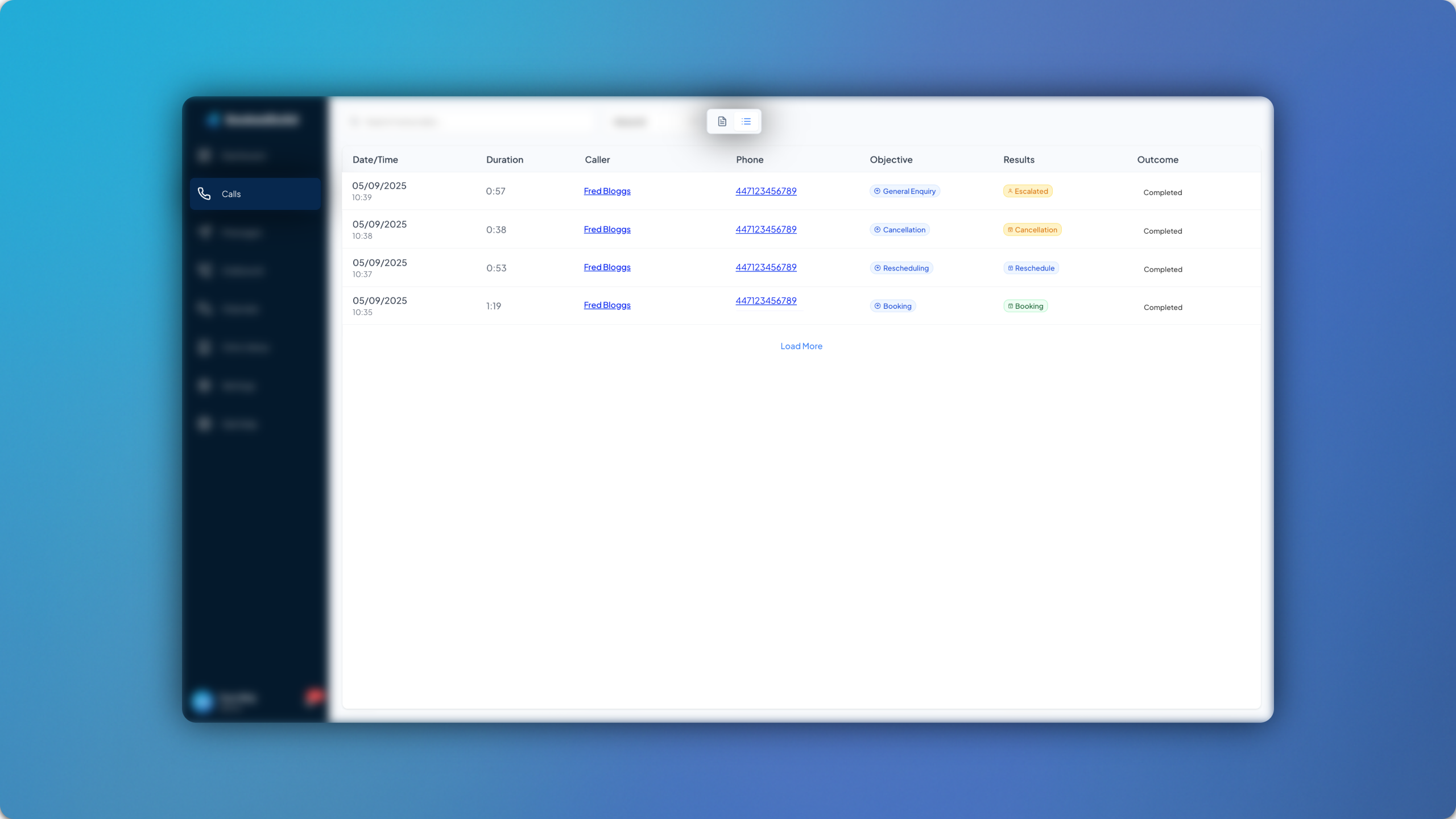
The calls tab has been updated with the addition of List view and Patient Hyperlinks! This has been introduced to improve the user experience of the platform, particularly for larger healthcare providers and virtual assistants who manage a higher volume of calls.
List View ✅
List view allows you to view calls more efficiently, without the transcripts occupying screen space.
When viewing calls in List View, you will see the following details for each call:
Date/Time
Duration
Caller
Phone
Objective
Results
Outcome
If the result of the call matches the objective, the outcome will automatically be ‘Completed’. For calls with ‘Incomplete’ outcomes, you can manually set the outcome back to ‘Completed’ once you have followed up with the patient and dealt with the enquiry.
To view more information on each call, simply click on the call and the transcript will pop up! You can switch between List View and the regular view via the toggle at the top of the screen.
Patient Hyperlinks 🔗
Patient Hyperlinks allow you to click on either the Caller or Phone details of each call and be taken directly to the patient’s record within your PMS.
Patient Hyperlinks are only visible for calls where the patient has an existing record in your PMS and hasn’t disguised their caller ID. This feature is also included in email notifications for bookings, reschedules and cancellations.
Patient Hyperlinks are only supported by clinics using Cliniko as their PMS.